Since its launch in October 2016, the Toogethr Rideshare-app has seen several updates. In the beginning the app was only used to find potential carpool partners, now it is possible to find a colleague along your commuting route, find alternative carpool matches and keep you and your colleagues informed about updates in the app and challenges via the community page.
In the past year we worked hard to further develop and improve the app. The result? Fewer error messages during use, a new look and feel of the app and a new feature: the “Check-In”. Curious about what this new feature entails? Read on!
New feature: the Check-In
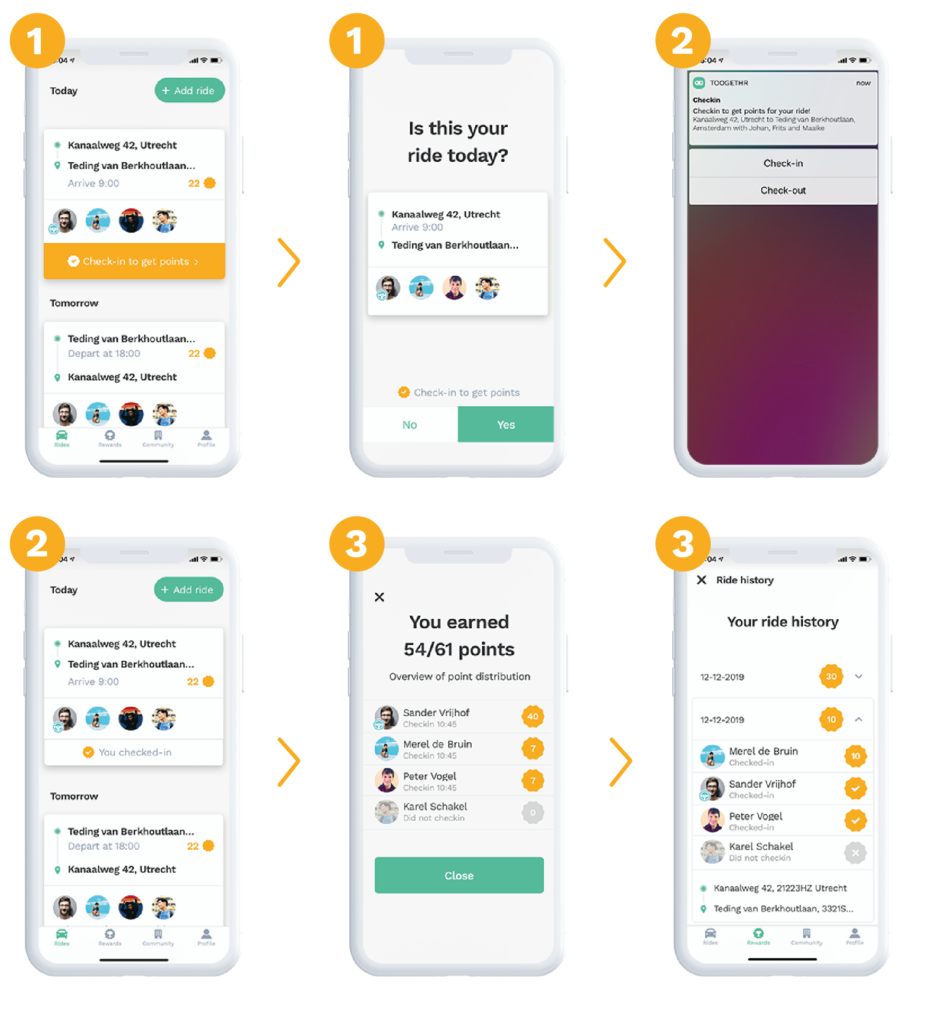
To earn points for your shared rides, you need to check-in for every ride.
How does this work:
1. Before the ride starts, the driver checks in via the app by looking up the ride in question and tapping “Check in now”. From this moment on, the ride cannot be edited anymore. Important: if the driver doesn’t check-in for a ride, the passengers cannot check in either and the ride cannot be registered. No points will be distributed for this ride.
2. After the driver is checked-in, the passenger(s) will get a notification and can check in by tapping on the notification or by going to the relevant ride in the app and tapping “Check in now”.
3. If both the driver and at least 1 passenger are checked in, the ride will be registered and the driver and checked-in passenger(s) will earn points for the ride. After the ride, you can see in the ride history which persons were or were not checked in and how many points were earned per person. Wondering where you can find the ride history? You can read it here.
4. If you have entered a recurrent ride, don’t forget to check in before each ride! Wondering how to create a recurrent ride? You can read about it here.
In case you did not receive points for your ride because you or the driver didn’t check-in, unfortunately the points will not be rewarded later either.
Do you have questions about the Check-In feature or other questions? Please feel free to contact support@toogethr.com.
Kind regards,
Team Toogethr